Cancelling, pausing and refunds
Last updated: November 3, 2026
You can cancel your subscription from Billing. Cancellation stops the next renewal; the confirmation shows when your current access ends.
How do I cancel?
An organization admin manages the subscription. If you cannot see the controls, ask an admin to open Billing in the organization that pays for the plan.
Open Settings → Billing.
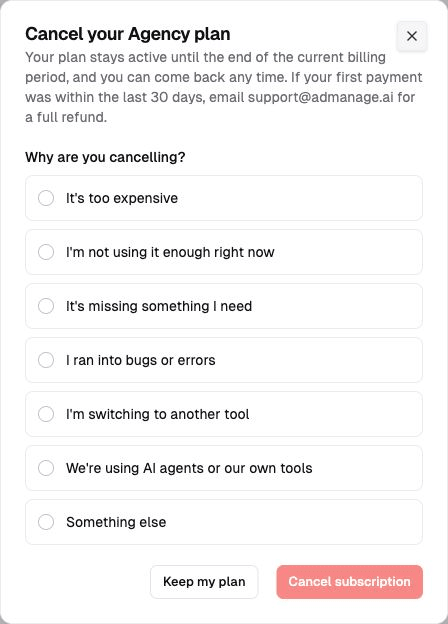
Select Cancel subscription.
Choose a reason. Additional feedback is optional.
If Before you go appears, review the alternatives or select Cancel subscription to finish.
Check the success message and the cancellation date on Billing.
Opening the dialog, selecting a reason, closing the tab or contacting support is not the same as completing cancellation. Check for the Cancelling status and the end date. If you cannot finish, contact support before renewal and describe what happened.

Does access stop immediately?
The cancellation flow says you keep full access until the end of the current billing period. Once the subscription has ended, paid launching access is removed unless your organization has another valid entitlement.
Cancelling AdManage does not send a pause instruction to ads already running on an advertising platform. If you also want advertising to stop, review and pause those campaigns separately.
Can I pause instead?
The cancellation dialog offers a pause of 1, 2 or 3 months, with automatic resumption. An active subscription is required. Read the offer shown for your subscription before accepting it; a pause and a cancellation have different outcomes.
A pause preserves your accounts, drafts and history and resumes billing automatically on the date shown. Paid storage packs stop while the subscription is paused, so check your Library usage before accepting. For another pause or an exception, contact support rather than assuming you can extend it indefinitely.
Can I get a refund or cancel an invoice?
Cancelling renewal does not automatically refund a payment or void an existing invoice. Ask support through AdManage to review a refund or invoice request. State which charge you mean and what you expected, without sharing full card details.
The published policy in the product allows a full refund of the first payment if you cancel within 7 days on Essential or Analytics, or 30 days on In-House, Agency or Enterprise. After that, unused time and periods left open but unused are not refunded. A charge made by AdManage in error is refunded in full regardless of date. Refunds go to the original card and normally appear in 5–10 business days.
To request an eligible refund, contact support with the payment date and invoice reference. Support checks the guarantee window or billing error and confirms the outcome. A discretionary exception is reviewed individually and is not a general entitlement.
What happens to stored media?
The Free Library allowance is 1 GB after cancellation. Reaching the storage limit blocks new uploads; it does not stop already launched ads.
Cancelling does not keep your media available indefinitely. Customer data can be deleted within 30 days of your agreement ending, so export important assets before your paid access ends. See the Privacy policy for details. To request deletion, or to ask what happens to your media, contact support.
Quick answers
Is closing the cancellation window enough? No, finish the flow and check the cancellation status.
Does cancellation refund the last payment? No, a refund requires a separate eligibility review.
Does cancellation pause my live ads? Pause live ads separately on the relevant platform.
Can I keep access until renewal? The cancellation confirmation shows your current access end date.