Advantage+ creative enhancements and the AI-media label
Last updated: October 30, 2026
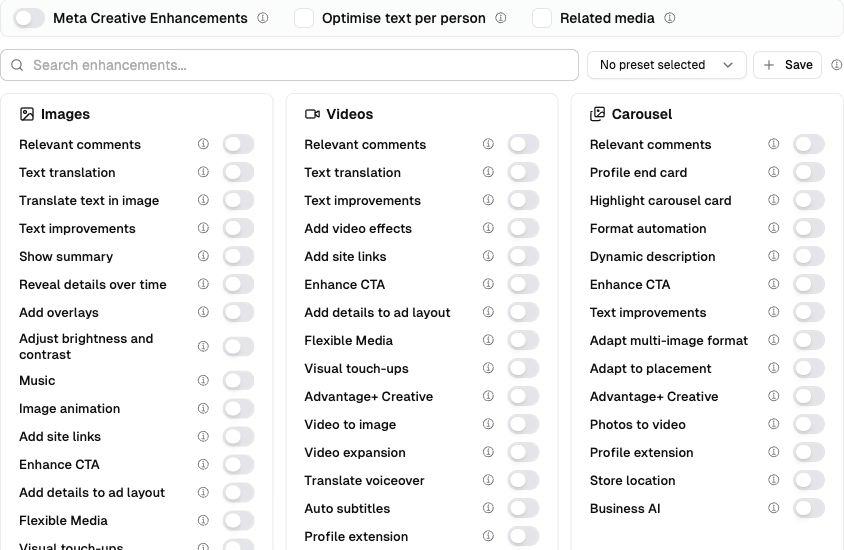
Creative enhancements, AI-media disclosure and product-display options are separate controls. Review each for your intended Meta ad instead of assuming one switch turns every automatic treatment off.
Where do I configure enhancements?
Select the Meta ad account in Launch.
Open the ad setup/default settings and find Creative Enhancements.
Review the categories and individual options, or use the available all-on/off control.
Save the intended defaults or preset, then inspect the settings on the final launch rows.
Enhancement presets are scoped to their ad account and workspace. A preset selected in one account should not be assumed to apply to every account your team manages. Template and row overrides can also affect the final configuration.
Will this change ads already live?
Launch defaults prepare future ads. Existing ads require an applicable edit action in Manage, followed by the flow's publish step. Availability depends on what the platform allows for that creative and field.
Do not assume every automatic treatment can be removed after launch. Review the current live-edit controls for the selected ad type rather than treating a launch-default switch as a retroactive change.
What is AI Media Disclosure?
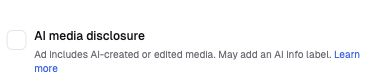
It declares that an ad's image or video contains AI-created or AI-edited content. It is separate from using Meta's enhancements. Choose the appropriate declaration for the actual media; turning off enhancements does not remove the need to declare AI media where required.
For supported existing ads, Manage → Bulk Edit → AI Media Disclosure is the dedicated action. Inspect the result for each selected ad.
A disclosure setting is not a promise that the platform will display or suppress a particular label in every placement. Meta can apply its own presentation and policies.
Where are product and multi-advertiser options?
Review product settings in their own Show products or product-display controls. In Manage, Change Product Set and Format Display Options address catalog/display choices. These are different from creative-enhancement presets.
Multi-advertiser settings are also distinct. Review them in the ad setup controls supported by the current launch. If a live ad does not expose an edit for that setting, contact support about the available workflow instead of repeatedly changing launch defaults.
How do I verify my choices?
Inspect the final row, preview and selected template before launch. After an edit, check the publish result and the platform's ad details. If the result differs, send support the affected batch/ad reference privately and describe the exact option.
Quick answers
Does turning off enhancements turn off AI disclosure? No.
Do new defaults update live ads? No, use an available live-edit action.
Is Show products part of the same switch? Review product settings separately.
Can a platform apply its own label? Yes, the declaration does not control every platform treatment.