Duplicate, copy and transfer ads across campaigns and accounts
Last updated: October 30, 2026
Choose the copy workflow that matches what you want to reuse: existing ads, an ad-set structure, or campaigns in another account. Review the destination and whether ads are included before submitting.
How do I reuse existing ads?
Select the destination ad account in Launch.
Open Load Media → Existing Ads.
Choose the source ads and review the loaded media, copy and identity.
Select the destination campaign/ad sets, make any intended changes, then review the launch status.
When using a saved draft with another account, load it into the current account and recheck account-specific assets. A Page, pixel, catalog, audience or ad-set ID that works in the source account may be unavailable in the destination.
How do I duplicate an ad set?
Use the ad-set duplication action, then choose the destination campaign and number of copies. Review the customization controls for naming, budget, schedule and ad status.
Duplicating the structure and copying its ads are separate choices. Check whether include ads is enabled. The status options include Paused, Active and Same as original; choose deliberately rather than assuming the source status will be inherited.
The destination campaign's objective must support the source ad set. A copy can fail when the optimization, destination, bid strategy or required assets do not match.
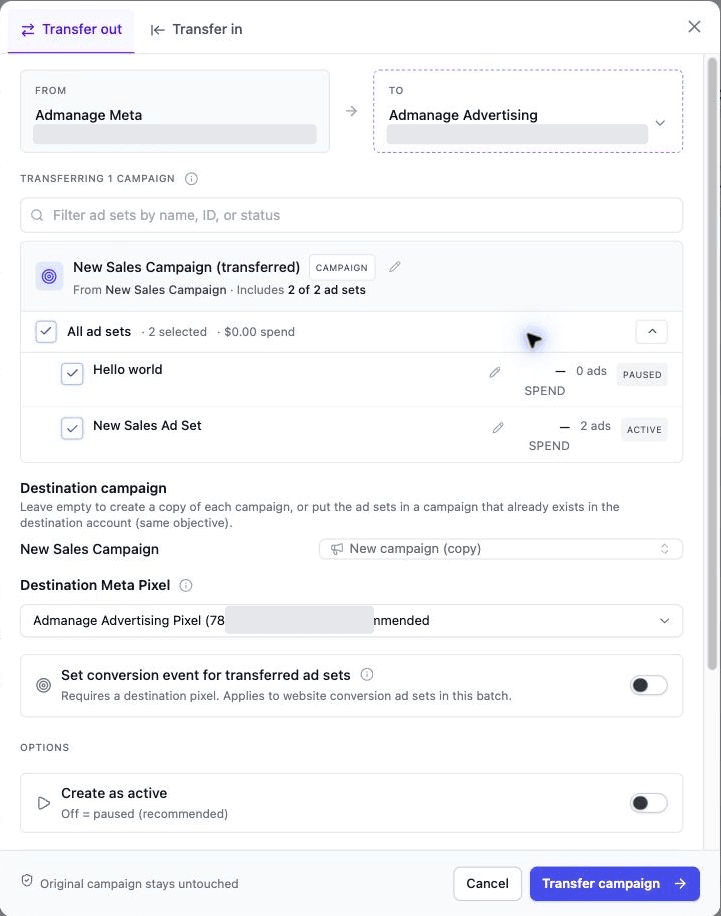
How do I transfer campaigns across Meta accounts?
Open Manage at campaign level.
Select the source campaigns and open the transfer dialog.
Use Transfer out to send selected campaigns to another account, or Transfer in to choose campaigns from another account.
Review destination account, ad sets, pixel, Page/Instagram identity and ad-copy options.
Inspect the transfer result, including any ads that failed after the structure was created.
Treat a transfer as a copy into a new destination. Review the source separately if you want it paused. Creating a destination campaign does not establish that all its ads copied successfully.
Will comments and likes carry over?
Reusing the original Post ID can preserve engagement where Meta permits that post to be used. Creating a new creative, editing copy or moving across accounts can require a new post. Do not assume every copy or cross-platform import retains social proof.
Keep existing reactions & comments makes a compatible duplicate share the original Facebook post. Meta Ads Manager then labels it Use existing post; that label is expected. Editing the creative or switching preservation off can create a new post without the original engagement.
For another network, use that network's import or launch workflow and review its identity, objective and creative requirements. Meta post engagement does not become TikTok or Snapchat engagement.
Quick answers
Does duplicating an ad set always copy its ads? Check the include-ads choice.
Can I edit the copy? Use a creative-copy flow; original Post ID reuse can restrict edits.
Can I use the same ad-set ID in another account? No, select destination-owned ad sets.
Does a transfer result guarantee every ad copied? No, check structure and ad results separately.