Manage table: search, filters, statuses, archived ads
Last updated: October 30, 2026
Use the account, hierarchy, search and filters together in Manage. A missing row can be outside the current view rather than deleted or disconnected.
How do I find an ad?
Select the intended workspace, platform and ad account.
Choose Campaigns, Ad sets or Ads as appropriate.
Search for the entity name or ID using the available search/filter control.
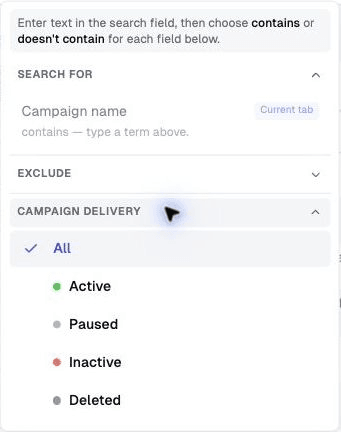
Review status and date filters, plus any selected parent campaign/ad set.
Refresh the relevant data if the entity was recently created or updated.
A campaign selection can narrow the ad-set view, and an ad-set selection can narrow the ads. Clear the parent selection when you want to search the whole account. Check the row count after changing filters before selecting a bulk action.
Why does the status look different?
An entity's own configured status and its effective delivery state can differ. For example, an Active ad can still be unable to deliver because its campaign is paused, its ad set starts in the future, it is in review, or it has a platform restriction.
Read the status explanation and check the parents in the advertising platform when needed. A successful launch confirms creation, not that impressions have started.
Where are archived or deleted ads?
Review the status filters and any archived/deleted visibility option offered for the selected platform. An archive/delete state can remove an entity from a normal active view.
For the Meta cleanup workflows, Bulk Delete Ads and Restore Deleted Ads are separate tools. Check the supported scope and confirmation in those tools before acting. Do not assume every platform deletion has a recovery option or that removing a filter restores an entity.
Can I share an ad link?
Use the preview or platform link available for the row. A platform management link can still require the recipient to have access to that ad account. It is different from a public preview/share link.
Keep account and ad references inside private team/support communication. Avoid putting customer account information in public screenshots or examples.
Why is the table stale?
Check whether a refresh completed and whether the error is a sync/permission failure. If a newly created item still does not appear after refreshing the correct account, contact support with the platform, approximate time and private entity reference. Do not repeat destructive actions because the table has not yet updated.
Quick answers
Does a missing row prove deletion? No, check scope and filters first.
Does Active always mean delivering? No, review parents, schedule and review status.
Will clearing a filter restore an ad? No, it only changes the view.
Can everyone open an Ads Manager link? The recipient may need account access.