Insights reports: build, filter, share, attribution window, data mismatches
Last updated: October 30, 2026
Start with the right accounts, date range and filters in Reports. Compare the same scope and attribution settings before treating a difference from Ads Manager as missing data.
How do I build or narrow a report?
Open the intended report or start a report from the available report types.
Select the ad accounts and date range.
Choose the grouping and metrics that answer your question.
Add filters for the campaign, ad set, ad name or other supported fields.
Save the configuration if you want to reuse it.
For a shortlist of creative, use an ad-name filter and the intended matching operator. Any and All conditions can produce very different results. A report that contains no rows may have an overly narrow combination of filters rather than a connection problem.
Team access still depends on role and workspace permissions. Do not assume that a report visible to an admin is automatically visible to every invited user.

Where is the attribution window?
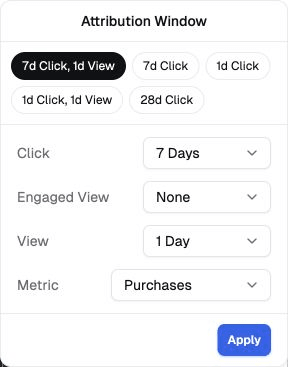
For supported Meta account selections, open the attribution button in the report toolbar, such as 7d Click, 1d View. Choose the click, engaged-view and view windows, the conversion metric, then Apply. Check which metric/window you are displaying. Changing a reporting view does not change the ad set's delivery or its attribution configuration on the platform.
If a control is missing, verify the selected channel and report type. Not every platform provides the same metrics or attribution breakdowns.
Why do numbers differ from another report?
Compare the same accounts, date boundaries/timezone, currency, filters, grouping, conversion event and attribution window. Also check refresh timing. Conversion reporting can update after the original day, and separate data sources may use different definitions.
A reach total, average or ratio may not equal a simple sum of visible rows. Inspect the metric definition instead of combining values that are not additive. A creative score is not the same measure as revenue or a guaranteed prediction of future performance.
Use the metric definitions available in your report. This guide does not prescribe a Convert Score formula, benchmark or color threshold.
How do I share a report?
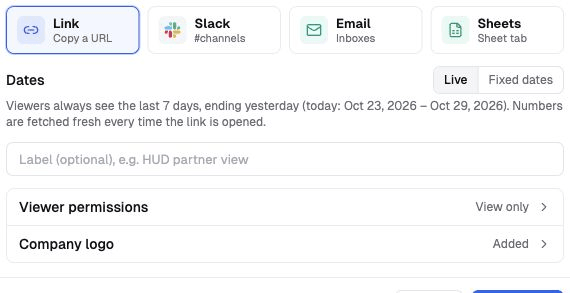
Use Share report and read the sharing notice. The dialog offers Link, Slack, Email and Sheets destinations; a link can use Live or Fixed dates, with viewer permissions shown before Create link. A public link can expose spend and results to anyone who has it. Check whether that particular share is a saved snapshot or shows current data, then review the shared view before sending it.
Public sharing and inviting a teammate are different choices. Use team access when the recipient needs the appropriate internal workspace permissions. Remove a public share when it is no longer needed using the share-management controls.
Quick answers
Does changing report attribution edit my ad sets? No.
Why is a metric missing? Check platform coverage, report type and the selected accounts.
Can a share link expose spend? Yes, review its notice and scope.
What should I compare first for a mismatch? Accounts, dates, filters, timezone and attribution.