Ad sets not showing up in AdManage
Last updated: October 15, 2025
If you're having trouble finding paused ad sets in AdManage, you can use the filtering and search features to locate them quickly.
Steps to find ad sets
Open the ad set selection interface, which displays all your ad sets
Apply the status filter and select "paused" to show only paused ad sets
Use the search function to enter specific ad set names or IDs if you're looking for particular ad sets
Optionally, use the campaign filter to narrow your results to specific campaigns
Still can't find it?
Try clicking "Complete Refresh" Under the Ad Set Refresh to do a total refresh.
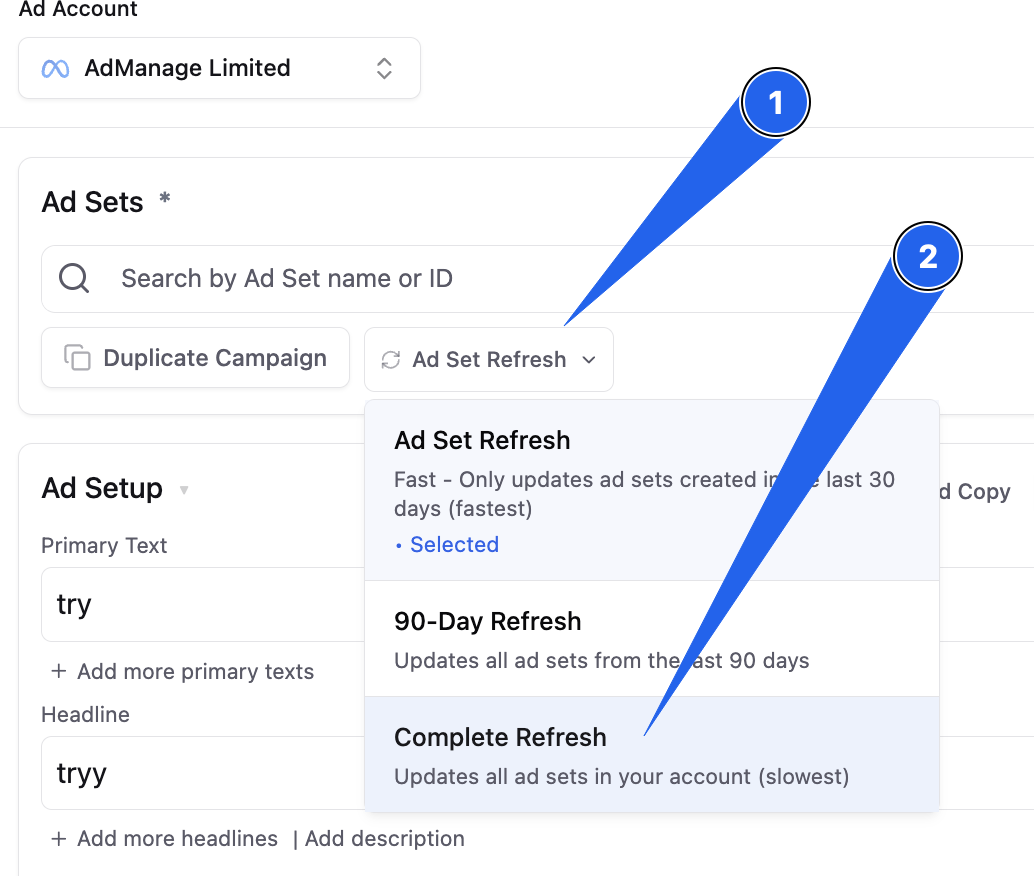
This method will help you locate any paused ad sets, including recently launched ones that may not be immediately visible in your default view.
If the adset is in a draft in your account, Admanage will not be able to see the adset until the adset is published.
If you are still not able to locate your adset, please contact support and we can help you!